A customer rings at ten to five. They give you an address, a date, a price they were quoted last month and a question you promise to come back on. By the time you have put the phone down, two more calls have come in. Sound familiar?
That is the problem automatic transcripts and AI call summaries set out to solve. They turn a recorded phone call into text you can search and skim, and then into a few lines that say what the call was about and what needs doing next. This guide explains how the technology works in general, where it genuinely helps, what its limits are, and how it works on our business phone system.
What a call transcript is
A transcript is a written version of a recorded call. Software called speech to text (sometimes called automatic speech recognition) listens to the recording and writes down the words it hears. Good transcripts also note when each line was said, so you can jump straight to the moment you need rather than listening to the whole call again.
Speech to text has improved a great deal in recent years. On a clear line with two people speaking normally, it is usually very readable. It still struggles with some things, and it is worth knowing what they are before you rely on it.
- Names, especially unusual surnames and street names
- Numbers read out quickly, such as phone numbers, postcodes and prices
- Strong accents, people talking over each other, and background noise
- Poor mobile signal or a call from a noisy vehicle
What an AI call summary is
A summary goes one step further. An AI language model reads the transcript and writes a short account of the call: who rang, why, and what was agreed. A useful summary also pulls out action items (things someone said they would do) and the details that matter, such as dates, times, references and amounts.
The important point is that a summary is only as good as the transcript underneath it. If the transcript mishears a house number, the summary will repeat the mistake. That is why any sensible system labels its summaries as a guide and lets you check the transcript and the recording behind them.
Where this genuinely helps a small business
The value is not in reading every call. It is in finding the right call quickly, and in not losing the details.
- Follow ups: action items mean the promised callback, quote or confirmation text does not slip through the cracks at the end of a busy day.
- Disputes: if a customer says they were quoted a different price, you can search the transcript and play the exact moment it was discussed, instead of relying on memory.
- Handovers: when a colleague picks up a job, they can read a two line summary of yesterday's call rather than asking the customer to explain everything again.
- Training: new starters can read real examples of calls handled well, and managers can spot where a script or a process is causing confusion.
- Busy owners: if you spend the day on site or on the road, you can catch up on calls your team took in a few minutes.
Privacy and telling callers you record
Transcripts and summaries start with a recording, so the normal rules on call recording apply. Under UK data protection law, a recorded call is personal data. The ICO's guidance on the right to be informed explains that you must give people privacy information at the time you collect their data, including why you are processing it and how long you keep it.
In practice, most businesses do three things:
- Play a short message before the call connects, such as "Calls may be recorded for training and quality purposes".
- Explain in their privacy notice why calls are recorded, whether they are transcribed or summarised, and how long recordings are kept.
- Tell their own staff. The ICO's guidance on monitoring workers says that, apart from very exceptional cases, you must inform workers about any monitoring.
If you use AI tools, the ICO also has a hub of guidance on artificial intelligence for organisations. This is a practical overview rather than legal advice, so if you are unsure what your business needs to do, start with the ICO's advice for small organisations.
When you compare providers, ask them plainly: where is the audio processed, what is sent to any third party, how long are recordings, transcripts and summaries kept, and can you switch the AI part off? You should get a straight answer to each.
How it works with us
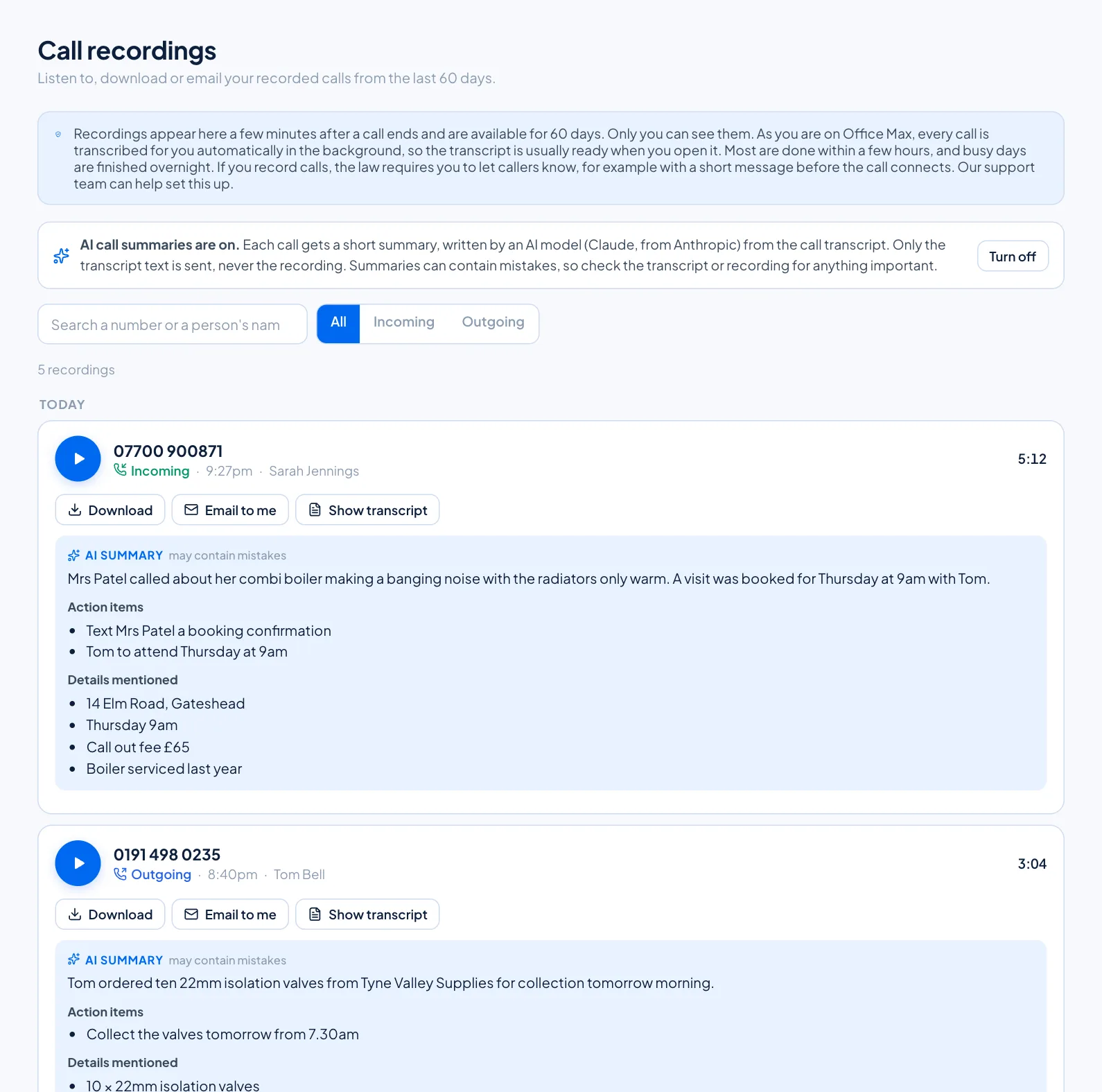
Call recording comes with Office Pro and Office Max. Recordings appear in your online portal a few minutes after a call ends, grouped by day, with the number, the direction of the call, the time, which of your users took it and how long it lasted. You can play, download or email any recording to yourself.
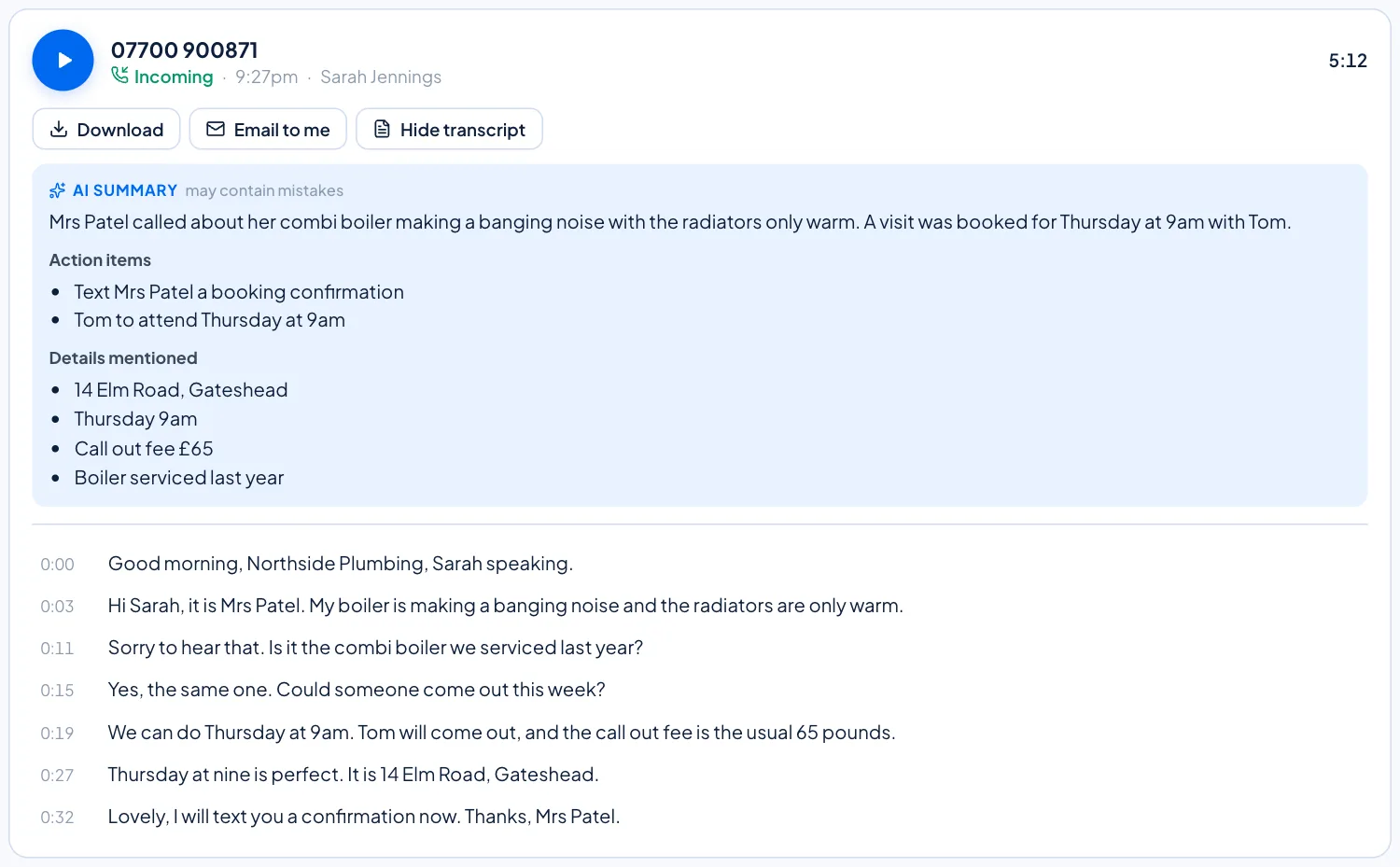
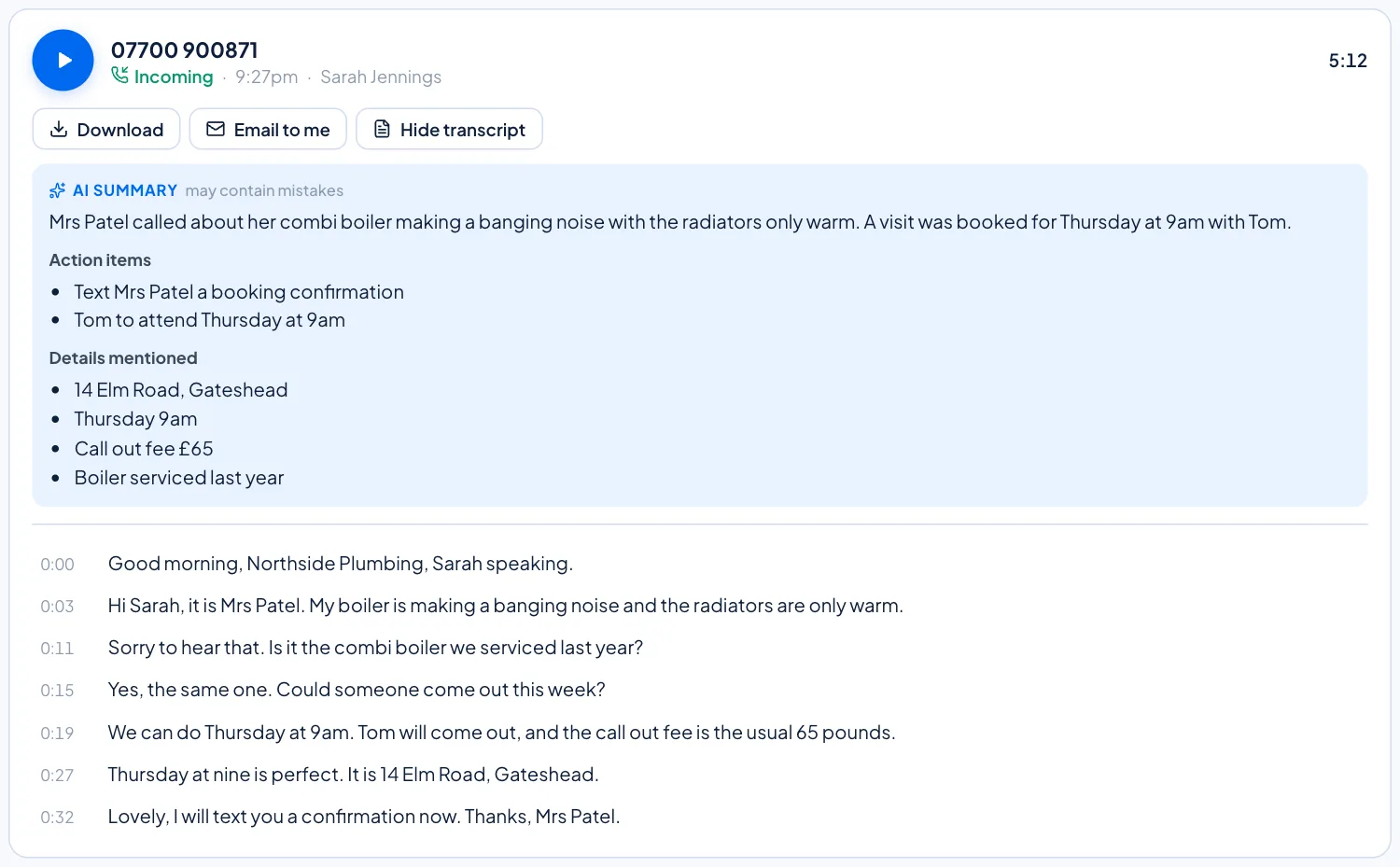
On plans with call recording you can turn any recording into text by clicking Transcript under the call. It usually takes under 30 seconds. Each line shows the time it was said, and clicking a line plays the recording from that point, with the line highlighted as you listen.
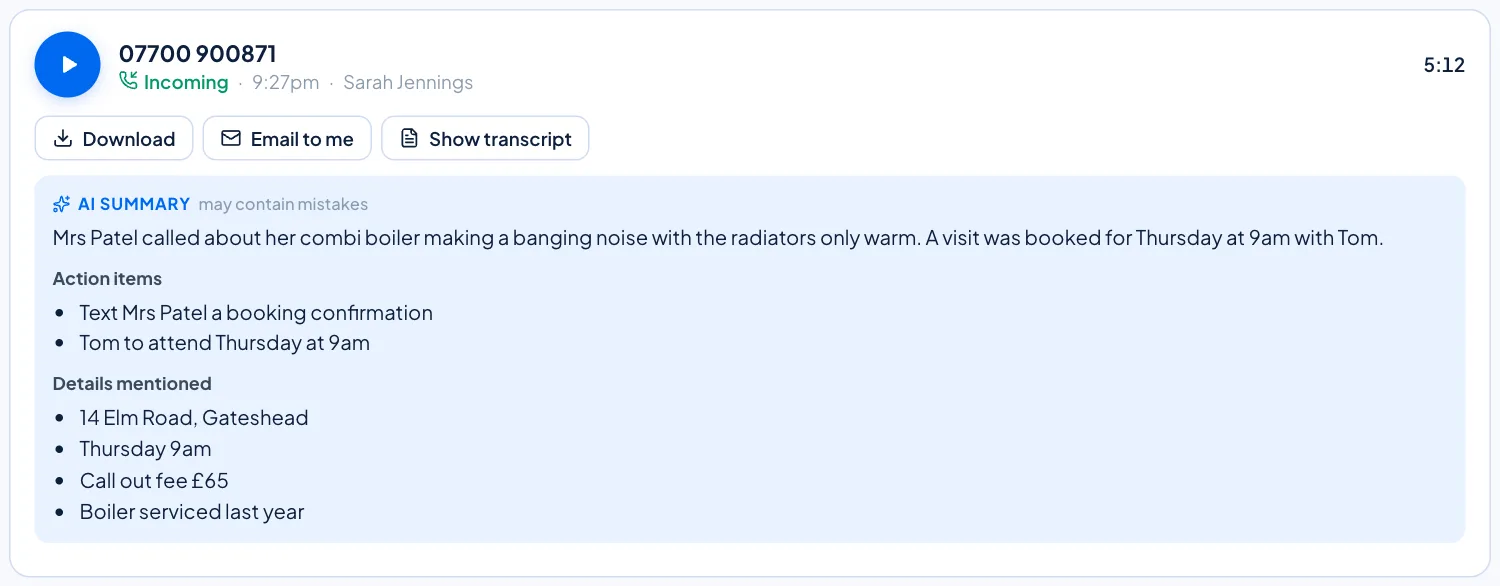
On Office Max, every recorded call is transcribed for you automatically in the background, so the transcript is usually waiting when you open it. Most are done within a few hours, and busy days are finished overnight. Each transcribed call then gets a short AI summary in a blue box with up to three parts: a one or two sentence Summary, Action items, and Details mentioned (names, numbers, dates, times, prices or references). If a call was only a wrong number or a voicemail greeting, the summary simply says so.
Here is how we handle your data:
- Transcripts are made on our own servers. The audio is not sent anywhere else.
- Summaries are written by an AI model (Claude, from Anthropic) from the transcript text only. The recording itself is never sent.
- Every summary is labelled may contain mistakes, so check the transcript or the recording before relying on a price, an address or a promise.
- Recordings stay in your portal for 60 days on Office Max (30 days on Office Pro). Transcripts and summaries are deleted at the same time as the recording, which is 90 days after the call on Office Max and 60 days on Office Pro.
- You can turn AI summaries off at any time from the Call recordings page. Doing so deletes the summaries already made, while your recordings and transcripts are kept.
How to get started
If you already take a lot of calls and lose time writing notes afterwards, Office Max gives you automatic transcripts and summaries on every recorded call. If you want recording and on demand transcripts without the AI summaries, Office Pro is a strong choice. Compare everything side by side on our business plans page, see the full list on business features, or contact our Sunderland team on 0191 543 3488 to talk it through.