LIMITED TIME: 10% off Office Pro, Virtual Voice Office for 3 months, new customers onlySee the deal →
The copper network switches off in 2027. Move your business lines now and keep your number.What this means for you 2027 →
Features

Business phone system features, configured for you

Everything below is either included as standard or set up by our team, so there's no PBX to buy and nothing to wire in.

Included with our plans

Direct-dial number per userINCLUDED

Every team member gets their own published number so customers reach them directly.

HD voice callingINCLUDED

Crystal clear wideband call audio on our apps and supported handsets.

Call transferINCLUDED

Move live calls to any colleague, team or external number in a tap.

Voicemail to emailINCLUDED

Voicemails delivered to the right inbox automatically.

Apps for mobile, desktop and browserINCLUDED

iPhone, Android, Windows and Mac apps and a click to dial Chrome extension, on every plan. Office Max adds a browser phone.

Online user and management portalINCLUDED

Manage users, call groups, call history and billing online. On every plan.

Hold musicINCLUDED

No dead air while callers wait. On every plan.

Call recordingINCLUDED

On Office Pro, Office Max and team packages on those plans. Record calls for training and compliance. Recordings stay in your portal for 30 days, or 60 days on Office Max, where every call is also transcribed automatically and given a short AI summary with action items.

Nuisance caller block listINCLUDED

Send us a number, or add it in your portal, and we block it for you. On Office Pro and Office Max.

Dedicated account managerINCLUDED

One named person who knows your business. On Office Pro and Office Max.

See the app before you buy

Most of our customers use the Your VoIP app every day. It is how your team make and take calls on iPhone and Android, and the same login works on Windows and Mac.
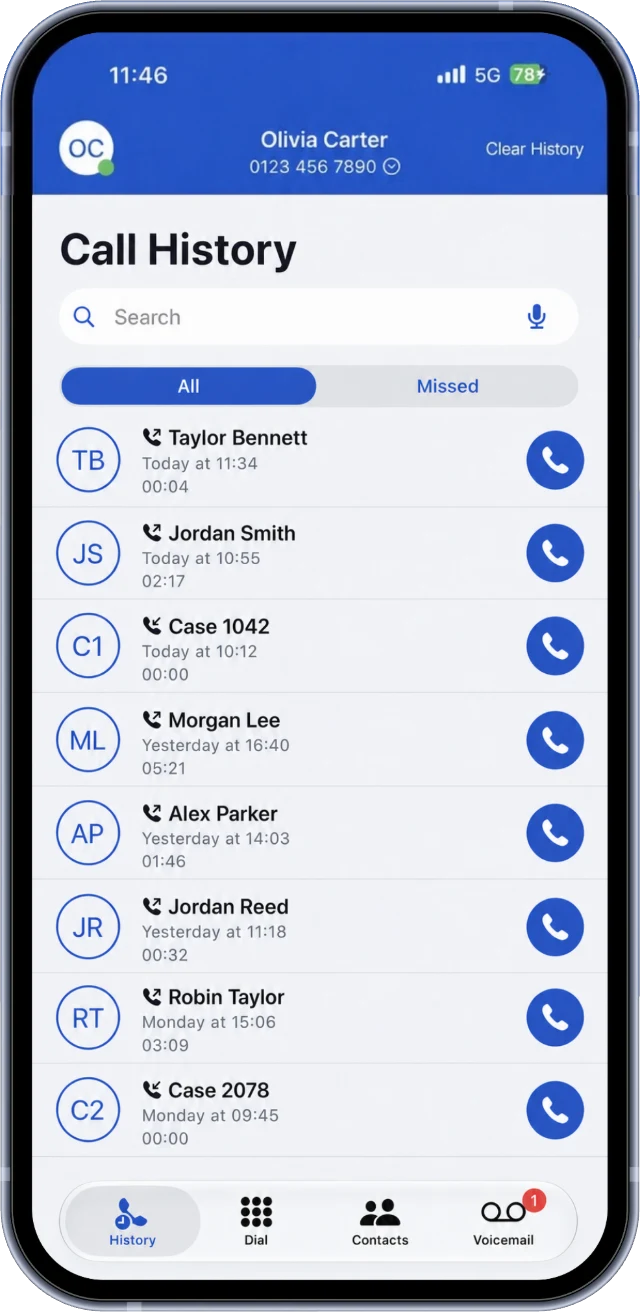
The Your VoIP app call history, with all and missed calls and a call back button on each one
Every call in one list
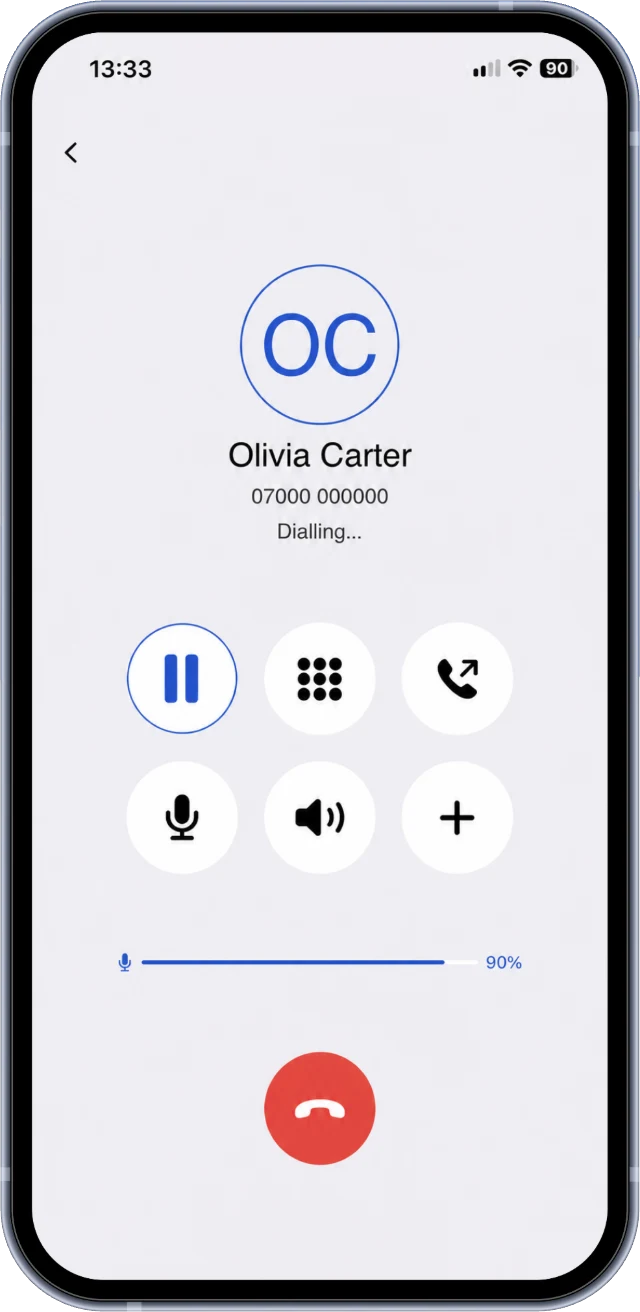
A call in progress in the Your VoIP app, with hold, keypad, mute, speaker and hang up buttons
Mute, hold, keypad and speaker
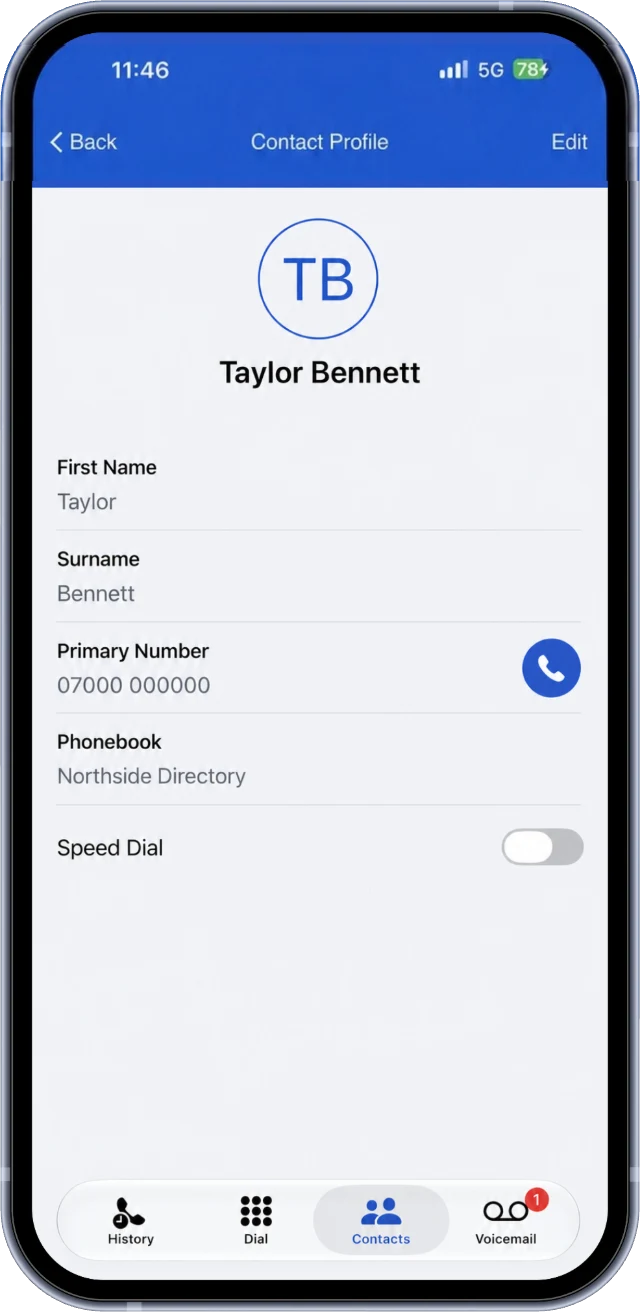
A contact in the Your VoIP app, with their number and a call button
Your contacts, one tap to call
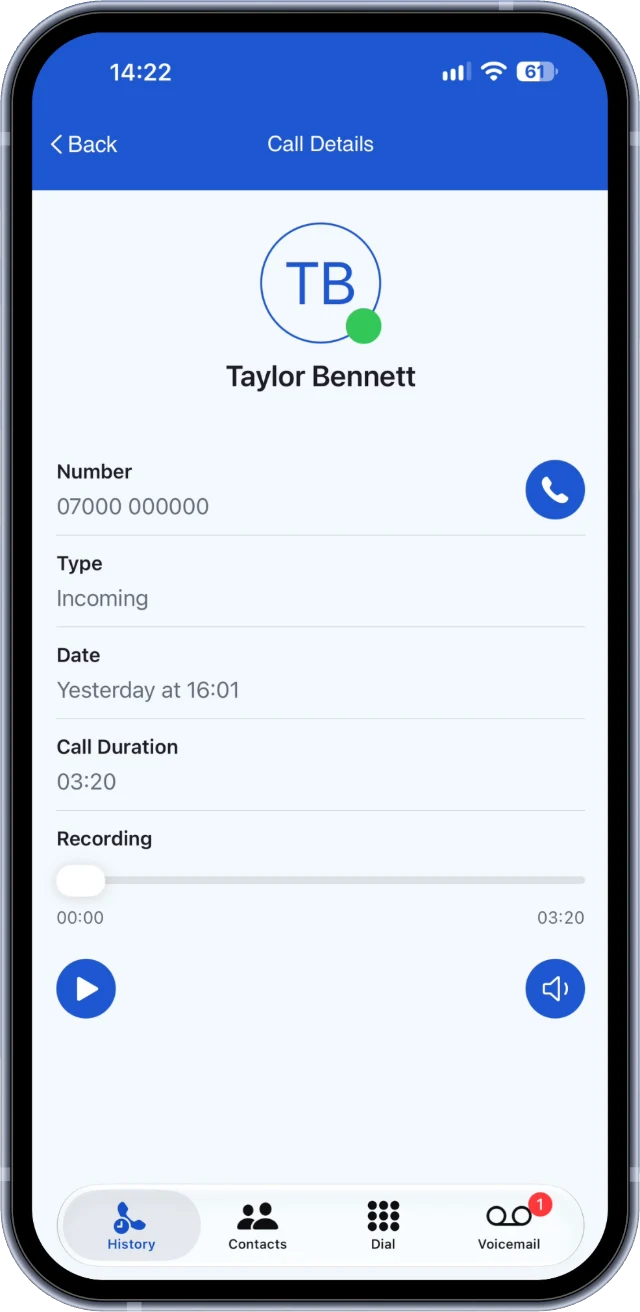
A recorded call in the Your VoIP app, with a play button and the recording timeline
Play call recordings in the app

Example screens from the Your VoIP app for iPhone, with made up names and numbers. Call recording is included on Office Pro and Office Max.
See every device and more of the app →
We configure

Set up by our team, to your spec

Tell us how your calls should flow and we build it with no admin headache for you.

IVR auto-attendantWE CONFIGURE
"Press 1 for sales…" menus that route callers to the right place.
Hunt groupsWE CONFIGURE
Ring teams in sequence or all at once so calls are always answered.
Business hoursWE CONFIGURE
Different routing in and out of hours, plus holiday handling.
On-hold music & messagesWE CONFIGURE
Custom hold music and announcements that reflect your brand.

Everything in Office Pro, plus

Office Max adds these extras, set up for you by our team. See every feature side by side on the plans page.

Browser phoneNEWOFFICE MAX

Make and take calls right in your web browser, with nothing to install. It is our best way to call from a computer, and we set it up for each of your users.

Microsoft Teams callingOFFICE MAX

Make and take business calls inside Teams, set up for you. A Microsoft Teams Phone licence is required.

CRM click to dialOFFICE MAX

Click a number in your CRM to call it, set up for you.

Microsoft 365 contacts on your phoneOFFICE MAX

Your Microsoft 365 contacts on your phone, so you can find and call people quickly.

Priority UK supportOFFICE MAX

Your requests are prioritised by our UK support team.

Compare all plans→
New

Hear our voices

Your greetings, menus and closed messages can be read by one of our natural sounding British AI voices. Type what callers should hear in your portal, press play to hear it, and save. It goes live on your phone system automatically.

  • Four British voices, at the speed you choose
  • Hear your own wording before it goes live, as many times as you like
  • For your auto attendant, business hours closed message, and each person's voicemail
  • Made on our own servers, so your wording is never sent to anyone else
  • Prefer your own recording? Upload it instead

AI voices are included with Office Pro, Office Max and team packages on those plans.

Each voice reading an example greeting
Emma Recommended
British female
Isabella
British female
George
British male
Fable
British male

“Thank you for calling Greenfield Dental. For appointments, press one. For anything else, press two, and one of the team will be with you shortly.”

New on Office Max

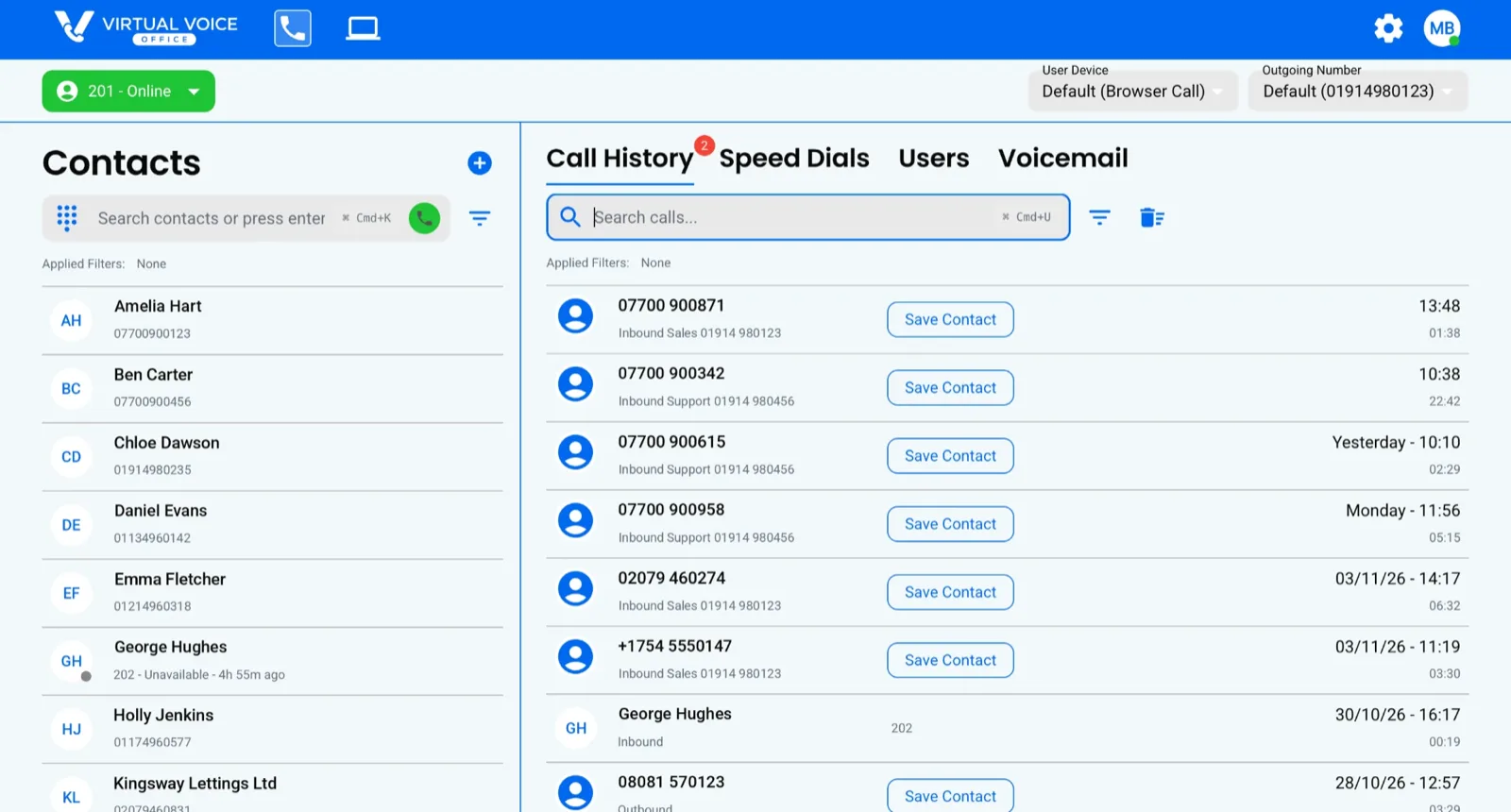
Your business phone, right in your web browser

Our browser phone is the easiest way to make and take calls on your computer. There is nothing to download or install: open the link, sign in, and your business number is ready to go.

  • Contacts, call history, speed dials and voicemail in one place
  • See who in your team is online, and call them in one click
  • Choose which business number shows when you call out
  • Works alongside your mobile and desktop apps, with the same login

Included on Office Max and set up for each of your users by our team. Available on request on other plans.

The Virtual Voice browser phone showing contacts, call history, speed dials, users and voicemail
Shown with example contacts and calls.
New on Office Max

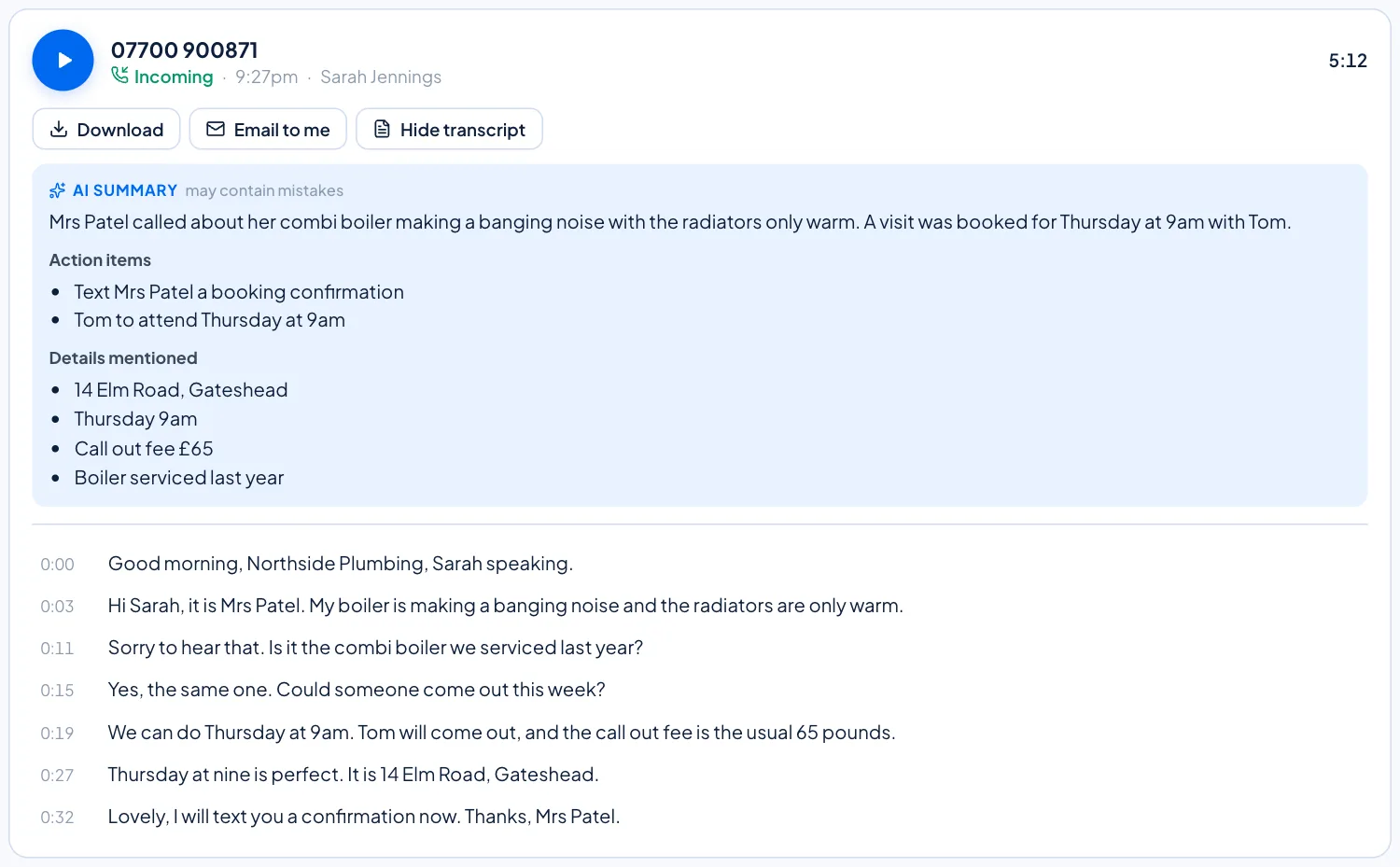
Every call transcribed, with an AI summary

On Office Max every recorded call is transcribed for you automatically, then given a short AI summary of who called, why, and what was agreed. Find the call you need in seconds, without listening back.

  • A short summary of each call, with action items and the details mentioned
  • The full transcript, timed line by line, next to the recording
  • Play, download or email any call from the last 60 days in your portal
  • Transcripts are made on our own servers. Only the transcript text is used for the summary, never the recording, and you can turn summaries off at any time

Call recording is included on Office Pro and Office Max. Automatic transcripts and AI summaries come with Office Max. Summaries are written by AI and can contain mistakes.

A recorded call in the Virtual Voice portal with its AI summary, action items, details mentioned and the timed transcript
Shown with an example call.

Emergency address: a legal requirement

Ofcom requires an emergency address for every number, so the emergency services can find you if anyone calls 999. We collect it during setup and you can update it any time from the portal. It takes seconds and keeps your team safe.

Bring your business numbers with you

Port geographic numbers for £29.95 and non-geographic for £69.95 ex VAT. No downtime: your lines keep ringing until they switch.

Port my numbers→
Hi! I'm Vee. Can I help you find the right plan today?